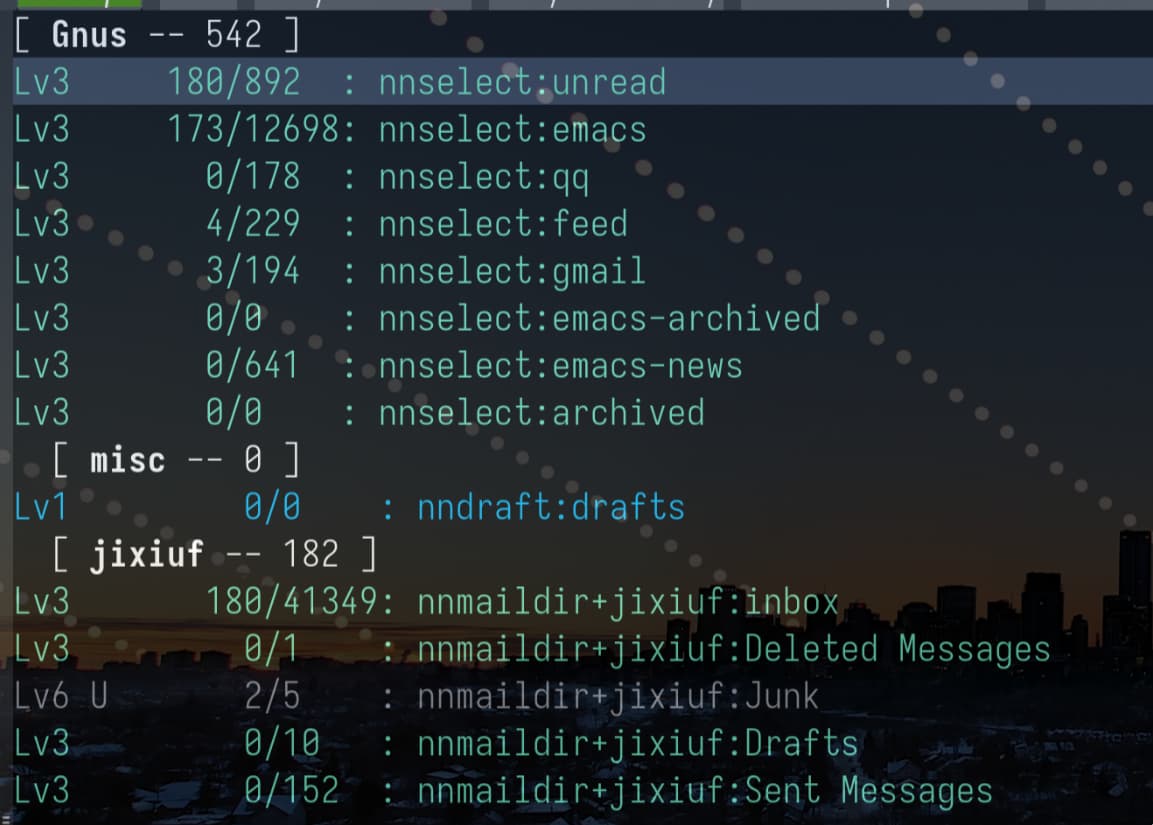
前一阵子折腾用Emacs收发邮件,刚从Doom转移到自己写的配置,有点玩腻了mu4e,就想着有没有其他的东西可以玩一玩,开始尝试Gnus这个老家伙……
中文互联网上能找到有关Gnus的内容真的很少,我大概拼凑出点基础配置,写了一篇文章,可能是由于「2026」这种关键词,在很多搜索引擎排名都靠前,甚至duckduckgo直接是首位,这也能证明中文互联网上有几乎没有关于Gnus的讨论了。还是说大牛们想玩Gnus都硬啃gnu.org的那本手册?
还有人在用Gnus吗?晒晒自己的配置和界面吧!
前一阵子折腾用Emacs收发邮件,刚从Doom转移到自己写的配置,有点玩腻了mu4e,就想着有没有其他的东西可以玩一玩,开始尝试Gnus这个老家伙……
中文互联网上能找到有关Gnus的内容真的很少,我大概拼凑出点基础配置,写了一篇文章,可能是由于「2026」这种关键词,在很多搜索引擎排名都靠前,甚至duckduckgo直接是首位,这也能证明中文互联网上有几乎没有关于Gnus的讨论了。还是说大牛们想玩Gnus都硬啃gnu.org的那本手册?
还有人在用Gnus吗?晒晒自己的配置和界面吧!
只用Gnus给 Emacs 报 Bug (M-x report-emacs-bug),和使用 M-x gnus-read-ephemeral-emacs-bug-group 看 Bug。
我的用法是使用 mbsync 将邮件下载到本地,通过定时任务使用notmuch 给邮件打tag, 然后利用gnus 的 group分组功能利用notmuch 打的tag进行分组:
效果如下(所有邮件其时来自同 一个qq 邮箱):
# .notmuch-config - Configuration file for the notmuch mail system
#
# For more information about notmuch, see https://notmuchmail.org
# Database configuration
#
# The only value supported here is 'path' which should be the top-level
# directory where your mail currently exists and to where mail will be
# delivered in the future. Files should be individual email messages.
# Notmuch will store its database within a sub-directory of the path
# configured here named ".notmuch".
#
[database]
path=/home/user/maildir
# User configuration
#
# Here is where you can let notmuch know how you would like to be
# addressed. Valid settings are
#
#	name		Your full name.
#	primary_email	Your primary email address.
#	other_email	A list (separated by ';') of other email addresses
#			at which you receive email.
#
# Notmuch will use the various email addresses configured here when
# formatting replies. It will avoid including your own addresses in the
# recipient list of replies, and will set the From address based on the
# address to which the original email was addressed.
#
[user]
name=user
[email protected]
[email protected]
# Configuration for "notmuch new"
#
# The following options are supported here:
#
#	tags	A list (separated by ';') of the tags that will be
#		added to all messages incorporated by "notmuch new".
#
#	ignore	A list (separated by ';') of file and directory names
#		that will not be searched for messages by "notmuch new".
#
#		NOTE: *Every* file/directory that goes by one of those
#		names will be ignored, independent of its depth/location
#		in the mail store.
#
[new]
tags=new;unread;inbox;
ignore=.uidvalidity;.mbsyncstate.new;.mbsyncstate.journal;.mbsyncstate;slrnpull.conf;pass;.nnmaildir;active;agent

# Search configuration
#
# The following option is supported here:
#
#	exclude_tags
#		A ;-separated list of tags that will be excluded from
#		search results by default.  Using an excluded tag in a
#		query will override that exclusion.
#
[search]
# Maildir compatibility configuration
#
# The following option is supported here:
#
#	synchronize_flags      Valid values are true and false.
#
#	If true, then the following maildir flags (in message filenames)
#	will be synchronized with the corresponding notmuch tags:
#
#		Flag	Tag
#		----	-------
#		D	draft
#		F	flagged
#		P	passed
#		R	replied
#		S	unread (added when 'S' flag is not present)
#
#	The "notmuch new" command will notice flag changes in filenames
#	and update tags, while the "notmuch tag" and "notmuch restore"
#	commands will notice tag changes and update flags in filenames
#
[index]
# 支持的搜索自定义header
# https://stackoverflow.com/questions/37480617/search-for-custom-header-value-in-notmuch
# after change config run:  notmuch reindex '*'
# then search with: notmuch search List:emacs-devel
header.List=List-Post

[maildir]
synchronize_flags=true

#  Local Variables:
#  mode: conf
#  eval: (add-hook (make-local-variable 'after-save-hook) #'(lambda()(shell-command "gpg -d notmuch-config.gpg>notmuch-config")) t)
#  End:
notmuch-post-new.sh
#!/bin/sh

# notmuch-post-new --- Notmuch rules that run after notmuch-new(1)
#
PROG=$( basename "$0" )
TEMP=$( getopt --options h,n --longoptions not-only-news,help -- "$@" ) || exit 1
eval set -- "$TEMP"
only_news="tags:new and "

for i in "$@"; do
    case "$i" in
        -h|--help)
            echo "Usage: $PROG --not-only-news"
            exit 0
            ;;
        -n|--not-only-news*)
            only_news=""
            shift
            ;;
    esac
done

shift # remove --

# https://notmuchmail.org/searching/
# https://notmuchmail.org/doc/latest/man7/notmuch-search-terms.html
# notmuch count tag:emacs
# 为tag:new 且List为emacs的邮件打上 emacs 的tag
notmuch tag  +emacs -- " $only_news (List:info-gnu-emacs.gnu.org or List:[email protected] or List:bug-gnu-emacs.gnu.org or List:emacs-devel.gnu.org or List:[email protected] or List:[email protected]) "

# 为tag:new 且List为info-gnu-emacs的邮件打上 emacs-info 的tag
notmuch tag  +emacs-info -- " $only_news (to:[email protected] or to:[email protected]) "

notmuch tag  +feed -- " $only_news (from:quoramail.com or from:quora.com) "

# 为tag:new 且... 的打上 private
notmuch tag  +private  " $only_news  ((to:jixiuf@qq* or to:374346117@qq*)  not from:.*@quoramail.com  not from:.*@quora.com not to:.*@debbugs.gnu.org not from:.*@debbugs.gnu.org  not from:[email protected] not to:[email protected] not  from:[email protected])"
notmuch tag  +gmail  " $only_news  (to:jixiuf@gmail.*)"
#
# 所有针对new 的tag 都打完后,就可以移除new这个tag了
notmuch tag -new -- tag:new
# tag all "new" messages "inbox" and "unread"
# notmuch tag +inbox +unread -new -- tag:new

# notmuch tag +archived -- date:2023-01-20..now
# https://notmuchmail.org/doc/latest/man7/notmuch-search-terms.html#relative-date-and-time
# notmuch-post-new --all
notmuch tag +emacs-archived -emacs -- '(date: 3 months)  and tag:emacs'
mbsync-notify
#!/usr/bin/bash
#
# Script to notify user for new mails.
# Crontab ex:
# */3 * * * * $HOME/.local/scripts/mbsync-notify.sh [acc_name]
#

# do not duplicate
killall mbsync &>/dev/null
#run mbsync once for all accs with named configs file, with quiet interface
# or specify account name as argument and define separate cron tasks for each acc
if [ -n $1 ]
then
  acc=$1
else
  acc=
fi
/usr/bin/mbsync  -a $acc -q 2>/dev/null

notmuch new
notmuch-post-new
emacs -batch  -l ~/.gnus.el -f gnus

#count new mail for every maildir, only in INBOX
# since there are maildirs/accounts in a format `~/Mail/account1/subacc1`,
# `~/Mail/account1/subacc2`, `~/Mail/account2/subacc1` etc
notification=""
# 遍历每个maildir目录
for maildir in "$HOME/maildir/"*/; do
  inbox_dir="${maildir}inbox"
  if [ -d "$inbox_dir" ]; then
      new_count=$(find "${maildir}inbox/new/" -type f | wc -l)
      old_count=$(find "${maildir}inbox/cur/" -type f | wc -l)
      if [ "$new_count" -gt 0 ]; then
          if [ "$notification" = "" ]; then
              notification+="目录: $(basename "$maildir") 新: $new_count 旧: $old_count"
          else
              notification+="\n目录: $(basename "$maildir") 新: $new_count 旧: $old_count"
          fi
      fi
  fi
done

# 如果有新邮件,发送一次通知
if [ -n "$notification" ]; then
  /usr/bin/notify-send -a "Mbsync" "✉ 新邮件!" "${notification}"
fi
mbsync.service
[Unit]
Description=Mbsync synchronization service

[Service]
#cjk
Environment="XAPIAN_CJK_NGRAM=1"
Type=oneshot
ExecStart=/usr/bin/sh -c '/usr/bin/mbsync -a'
ExecStartPost=/usr/local/bin/mbsync-notify
[Install]
WantedBy=default.target
mbsync.timer
[Unit]
Description=Mysync synchronization timer

[Timer]
OnBootSec=1m
OnUnitActiveSec=20m
Unit=mbsync.service

[Install]
WantedBy=timers.target
一开始我是使用的 mu4e 来看邮件的,但是需要使用 mbsync 同步到本地就觉得非常不舒服。于是就切换到了 gnus, 当初是看着 gnus.org 的 manual 配置的,基本上配置的也只是一些视觉上的东西,如怎么展示 thread. 供参考 .emacs.d/lisp/init-mail.el at master · condy0919/.emacs.d · GitHub
我用sendmail+smtpmail收发邮件,用gnus作为阅读器。
会用 gnus 看邮件列表,普通的邮件用 mac 自带的 mails
gnus很強,收發郵件,看rss都用它。其它mu4e,notmuch,rmail,elfeed都用過,還是gnus最好