看起来很好!
简单抽象了 effect 插件, 类似 KWin 的插件组织方式,现在可以很方便的写特效了 开机画面, 鼠标拖尾 都是通过 effect 插件的形式实现
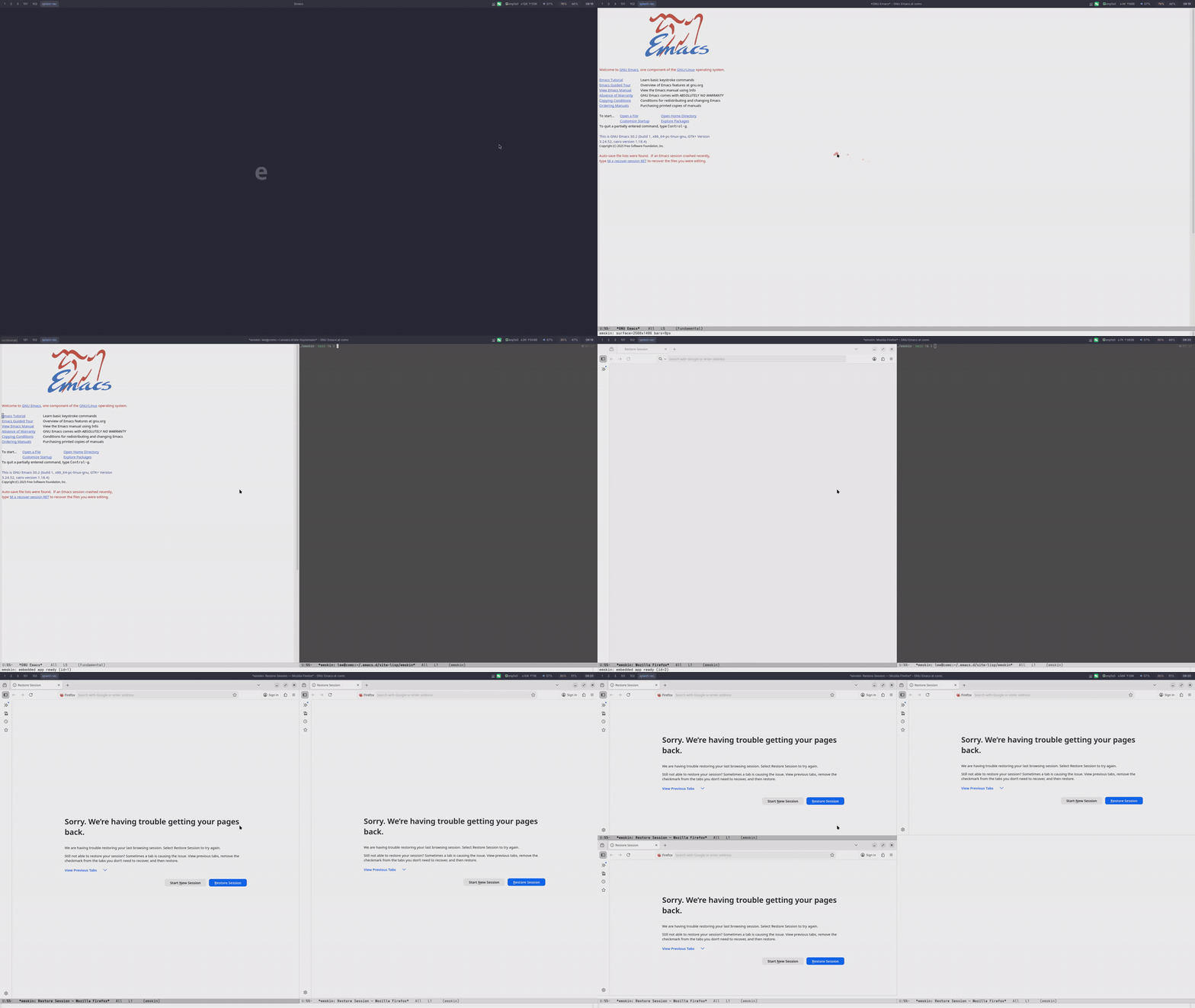
emacs本身不就是exwm么 
是吗, 我还以为是一个窗口管理器呢
直接把Emacs当成窗口管理器
更新到 到 0.3.1
更新了,好像还是有些问题 
我用raylib写了一个小的demo,只有disable和获取cursor信息的功能,然后发现是只在鼠标进入窗口的一瞬间有速度信息,读到鼠标的位置也不会再发生变化 
#include <raylib.h>
#include "raymath.h"
#include <math.h>
int main(void)
{
    InitWindow(800, 600, "Mouse Debug");
    DisableCursor();

    SetTargetFPS(60);

    while (!WindowShouldClose())
    {
        Vector2 delta = GetMouseDelta();
        Vector2 pos   = GetMousePosition();
        BeginDrawing();
        ClearBackground(RAYWHITE);
        DrawText("Mouse Debug Info", 10, 10, 20, BLACK);
        DrawText(TextFormat("Delta X: %.2f", delta.x), 10, 50, 20, DARKGRAY);
        DrawText(TextFormat("Delta Y: %.2f", delta.y), 10, 80, 20, DARKGRAY);
        DrawText(TextFormat("Pos X: %.2f", pos.x), 10, 130, 20, DARKGRAY);
        DrawText(TextFormat("Pos Y: %.2f", pos.y), 10, 160, 20, DARKGRAY);
        EndDrawing();
    }
    CloseWindow();
    return 0;
}
效果很惊艳啊,不过我在 niri 下使用有键盘映射的问题,我在 niri 配置里交换了 CapsLock 和 Ctrl:
input {
    keyboard {
        xkb {
            options "ctrl:swapcaps"
        }
    }
}
进入 emskin(–standalone 模式)后,键位交换就不起作用了,CapsLock 和 Ctrl 还是原始映射。
不过测试发现,像emskin --standalone --xkb-options "ctrl:swapcaps"这样手动传递参数是可以解决,不知道有没有更好的方式让 emskin 自动继承 niri 的 xkb options?
最初的版本是自动检测的, 我不是很喜欢 rust 里面用 system binding 的库, 后面会考虑实现一个简单的配置系统, 可以直接在配置设置
2 个赞
大佬太强了
看自述说是目前 sway 还不支持 x11? 那对其他一些窗口管理器支持怎么样?
项目里面我的描述有问题, emskin 是支持在x11 和 wayland 桌面下面运行的, 目前测试到是列表列出来的, 因为 sawy 没有 x11 实现, 就用 - 代替了
1 个赞
试试更新到 v0.3.4,问题解决了, 是 xwayland程序的鼠标焦点没处理好
所以我的理解是:那个表格其实是对桌面的不同变体上的 emskin 功能的描述,而不是指: emskin 是否可以打开 x11 应用/ wayland 应用
今天给 emskin 提交了三个补丁
- –fullscreen 选项可以让 emskin 全屏启动
- 修复了 emskin 运行 lazycat-terminal exit退出后 window-p 的错误
- emskin-open-native-app 默认用当前 window 打开系统GUI程序, 和EAF行为保持一致
争取今年把 EAF browser, EAF file-manager, EAF terminal, EAF git client, popweb 都迁移过来
7 个赞
是的, 表格列出的都是测试过的桌面
这个方案是支持 x11/wayland 两种桌面的, 表格没列出来是没有经过实际的测试
1 个赞
这是 emskin 的剪切板设计架构, 感兴趣的可以看看, 处理了 |外部 wayland(data_device,data_control 协议),xwayland,x11 |<-> | 内部 wayland,xwayland |
大佬们,mac下面也考虑一下吧,太眼热了。
看了心痒痒,试了发现报错:
--- stderr

thread 'main' (23971) panicked at ~/.cargo/registry/src/index.crates.io-1949cf8c6b5b557f/smithay-client-toolkit-0.19.2/build.rs:3:49:

called `Result::unwrap()` on an `Err` value: "
pkg-config exited with status code 1
> PKG_CONFIG_ALLOW_SYSTEM_LIBS=1 PKG_CONFIG_ALLOW_SYSTEM_CFLAGS=1 pkg-config --libs --cflags xkbcommon

pkg-config output:
  Package xkbcommon was not found in the pkg-config search path.
  Perhaps you should add the directory containing `xkbcommon.pc'
  to the PKG_CONFIG_PATH environment variable
  Package 'xkbcommon' not found

The system library `xkbcommon` required by crate `smithay-client-toolkit` was not found.
The file `xkbcommon.pc` needs to be installed and the PKG_CONFIG_PATH environment variable must contain its parent directory.
The PKG_CONFIG_PATH environment variable is not set.

HINT: if you have installed the library, try setting PKG_CONFIG_PATH to the directory containing `xkbcommon.pc`.
"
note: run with `RUST_BACKTRACE=1` environment variable to display a backtrace
warning: build failed, waiting for other jobs to finish...
试了几个cargo add命令都没解决。系统是openSUSE Tumbleweed,与xkbcommon近似的是libxkbcommon。
我不咋了解rust,不知道是哪儿的问题,请教接下来该怎么排查?
分别试试 libxkbcommon0 和 libxkbcommon-x11-0
mac上是不是有人搞过类似的 