受到最近 HN 上一则讨论关于「如何入门现代 Emacs」的启发,我发现自己的 Emacs 虽然功能上用起来很顺手了,但是 外观 上感觉还是有点「老僜」,不够现代,所以好奇坛友们有没有什么独家秘诀,可以分享一二的?
1 个赞
Emacs 以默認的樣式就很美好,我不是在開玩笑。
如果你想要讓它更加美好,推薦使用Prot 的主題和字型,以及他設計的 spacious-padding套件。
5 个赞
Prot的字体宽度是525,用了以后中英文不好对齐。可以试试我的中英文合并字体,GitHub - georgealbert/Iosevka: Versatile typeface for code, from code. 霞鹜文楷(LXGWWenKaiLite Mono) + Iosevka中英文合并字体,详见Releases。
1 个赞
喜欢法国佬的可以折腾一下 svg-tag-mode,有更多留白。但我感觉纯文本的 Emacs 来说还是密集一些比较好看(
1 个赞
一些我覺得"好看"的包:
- doom-modeline
- centaur-tabs
- highlight-indent-guides
- ts-fold 裡的
indicators-mode(我自己是作者)
剩下應該就是搭配 theme 來看起來比較美觀吧? 
3 个赞
独家秘诀:把屏幕关掉,此时什么都看不见,所以看到的一切都是完美的。
老实说我觉得emacs的美感来自动态而非静态,就像体操运动员的美感。我做的主题非常花,只是为了便于识别哪些元素在动。
看见你有什么让 Emacs 更美观的技巧? ,突然发现我还没分享过自己的Emacs GUI配置,现记录如下。
示例图
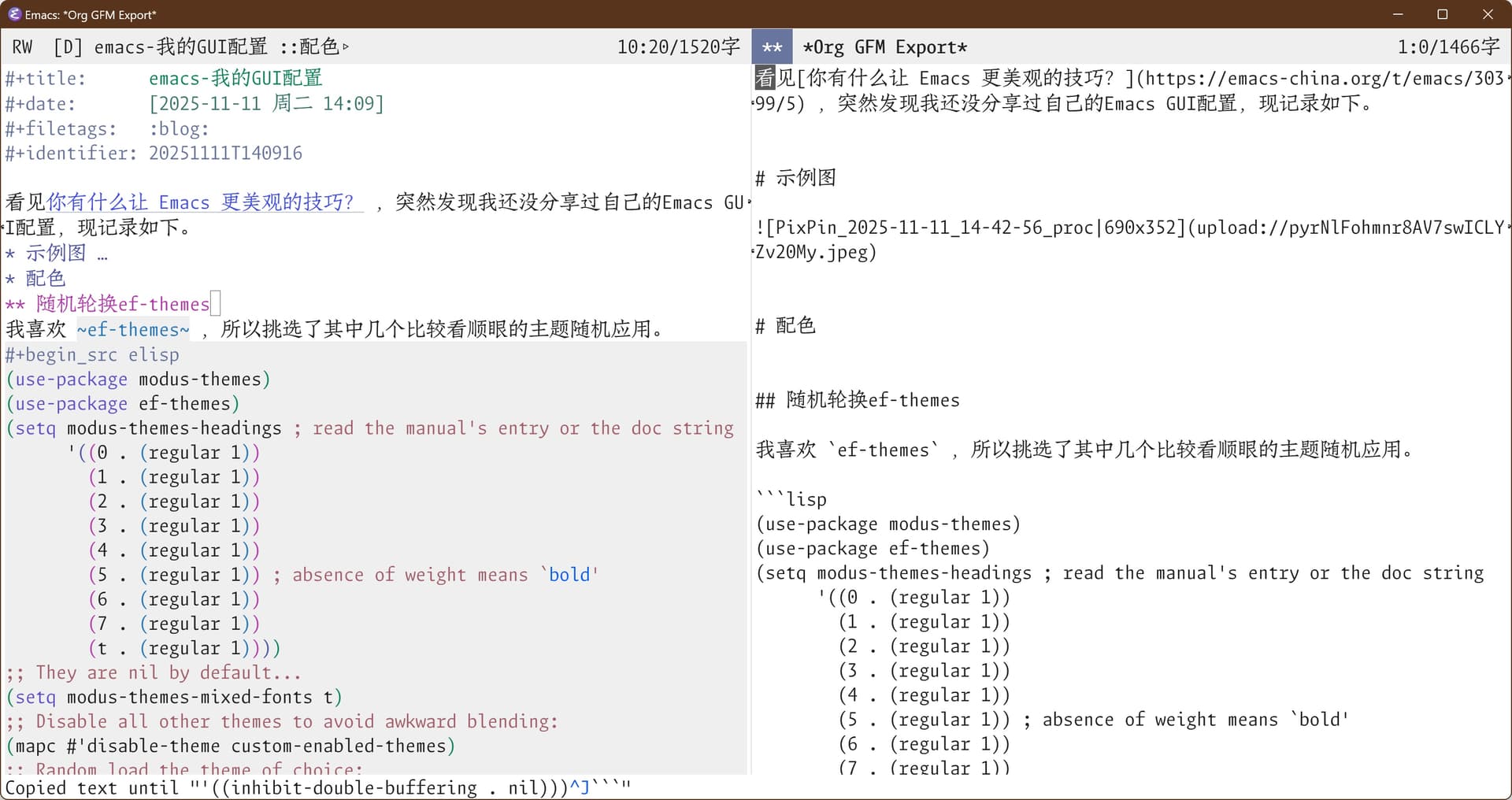
配色
随机轮换ef-themes
我喜欢 ef-themes ,所以挑选了其中几个比较看顺眼的主题随机应用。
(use-package modus-themes)
(use-package ef-themes)
(setq modus-themes-headings ; read the manual's entry or the doc string
      '((0 . (regular 1))
        (1 . (regular 1))
        (2 . (regular 1))
        (3 . (regular 1))
        (4 . (regular 1))
        (5 . (regular 1)) ; absence of weight means `bold'
        (6 . (regular 1))
        (7 . (regular 1))
        (t . (regular 1))))
;; They are nil by default...
(setq modus-themes-mixed-fonts t)
;; Disable all other themes to avoid awkward blending:
(mapc #'disable-theme custom-enabled-themes)
;; Random load the theme of choice:
(let* ((themes '(ef-arbutus ef-cyprus ef-day ef-eagle ef-elea-light ef-frost ef-kassio ef-light ef-maris-light ef-melissa-light ef-reverie ef-spring ef-summer ef-trio-light))
       (loaded (seq-random-elt themes)))
  (load-theme loaded :no-confirm))
代码块颜色一体化
默认的代码块内部颜色不会变,这里调整为整体深色
(setq org-fontify-quote-and-verse-blocks t)
(set-face-attribute 'org-code nil :background
                     (face-attribute 'org-block :background))
设置sis的光标颜色
(setq sis-other-cursor-color (modus-themes-with-colors cursor))
(setq sis-default-cursor-color (modus-themes-with-colors fg-dim))
设置org-todo-keywords颜色
MacOS上可以在指定bold时自动选择更粗字体,但Windows上需要手动选用粗一点的字体,然后再加粗。
;; 设置org-TODO-keywords颜色
(if (eq system-type 'darwin)
    (setq org-todo-keyword-faces `(("TODO" . (:foreground ,(modus-themes-with-colors red-warmer) :weight bold))
                                     ("HOLD" . (:foreground ,(modus-themes-with-colors yellow-warmer) :weight bold ))
                                     ("XXXX" . (:foreground ,(modus-themes-with-colors magenta-warmer) :weight bold ))
                                     ("DONE" . (:foreground ,(modus-themes-with-colors green-warmer) :weight bold ))))
  (setq org-todo-keyword-faces `(("TODO" . (:foreground ,(modus-themes-with-colors red-warmer) :family "LXGW Bright Code GB regular" :weight bold))
                                     ("HOLD" . (:foreground ,(modus-themes-with-colors yellow-warmer) :family "LXGW Bright Code GB regular" :weight bold))
                                     ("XXXX" . (:foreground ,(modus-themes-with-colors magenta-warmer) :family "LXGW Bright Code GB regular" :weight bold))
                                     ("DONE" . (:foreground ,(modus-themes-with-colors green-warmer) :family "LXGW Bright Code GB regular" :weight bold)))))
modeline
我用 nano-modeline ,简约实用。同时进行了一些modeline展示项的自定义化
(use-package nano-modeline
  :demand t
  :config
  (setq-default mode-line-format nil)
  (add-hook 'prog-mode-hook            #'nano-modeline-prog-mode)
  (add-hook 'text-mode-hook            #'nano-modeline-text-mode)
  (add-hook 'org-mode-hook             #'nano-modeline-org-mode)
  (add-hook 'elfeed-show-mode-hook     #'nano-modeline-elfeed-entry-mode)
  (add-hook 'elfeed-search-mode-hook   #'nano-modeline-elfeed-search-mode)
  (add-hook 'term-mode-hook            #'nano-modeline-term-mode)
  (add-hook 'messages-buffer-mode-hook #'nano-modeline-message-mode)
  (add-hook 'org-capture-mode-hook     #'nano-modeline-org-capture-mode)
  (add-hook 'org-agenda-mode-hook      #'nano-modeline-org-agenda-mode)
  (nano-modeline-text-mode t)
  (setq nano-modeline-window-dedicated-symbol '("● " . "")))
覆盖Git图标
Windows上的nerd-icon有时会有问题,这里用纯文本代替
(defun nano-modeline-git-info (&optional symbol)
  "Git information as (branch, file status)"
  (when vc-mode
      (when-let* ((file (buffer-file-name))
                  (branch (substring-no-properties vc-mode 5))
                  (state (vc-state file)))
        (propertize (format "(%s %s, %s)" (or symbol "Git") branch state)
                    'face (nano-modeline-face 'primary)))))
添加org文件中的路径显示
下面的函数为 nano-modeline 添加了 org-mode 中的路径显示功能
(defun my/nano-modeline-path-info ()
  "Current cursor path info as 'outline1 > outline2' "
  (when (eq major-mode 'org-mode)
    (propertize (format-mode-line '((:eval (format "::%s" (mapconcat (lambda (x) (let ((y (string-trim-left x "COMMENT ")))
                                                                                   (truncate-string-to-width y 22)))
                                                                     (org-ql--outline-path)
                                                            "▹")))))
                'face (nano-modeline-face 'secondary ))))

(defun adv/nano-modeline-org-mode ()
  "Nano line for org mode"
  (funcall nano-modeline-position
           '((nano-modeline-buffer-status) " "
             (nano-modeline-org-buffer-name) " "
             (my/nano-modeline-path-info))
           '((nano-modeline-cursor-position)
             (nano-modeline-window-dedicated))))
(advice-add #'nano-modeline-org-mode :override #'adv/nano-modeline-org-mode)
添加buffer字数统计
下面的函数为 nano-modeline 添加了字数统计功能,用到的统计库在这里:https://github.com/LdBeth/advance-words-count.el
;;定义buffer-words变量
(defvar my/buffer-words 0
  "The number of characters in the current buffer.")

;;变成buffer-local变量,确保另一个buffer的modeline不会受到影响
(make-variable-buffer-local 'my/buffer-words)
;; 引用第三方统计库
(use-package advance-words-count
  :load-path "~/.emacs.d/elpa/")

;; 下面函数统计并更新当前buffer字数
(defun my/buffer-words-count ()
  "Return the number of characters in the current buffer."
  (unless (> my/buffer-words 50000)
    (setq my/buffer-words
          (if (use-region-p)
              (+ (words-count (region-beginning) (region-end) words-count-rule-CJK)
                 (words-count (region-beginning) (region-end) words-count-rule-ansci))
            (+ (words-count (point-min) (point-max) words-count-rule-CJK)
               (words-count (point-min) (point-max) words-count-rule-ansci))))
    (force-mode-line-update)))

;;窗口切换后更新字数
(add-hook 'window-configuration-change-hook #'my/buffer-words-count)
;; buffer调整后更新字数
(add-hook 'buffer-list-update-hook #'my/buffer-words-count)
;; 空闲时(针对scratch)更新字数
(run-with-idle-timer 2 t #'my/buffer-words-count)

;; 自定义nano-modeline的内容
(defun adv/nano-modeline-cursor-position (&optional format)
  "Cursor position using given FORMAT."
  (let ((format (or format "%l:%c ")))
    (propertize (format-mode-line '(
                                    "%l:%c/"
                                    (:eval (format "%s字" my/buffer-words)) "  "))
                'face (nano-modeline-face 'secondary ))
    ))
(advice-add #'nano-modeline-cursor-position :override #'adv/nano-modeline-cursor-position)

(defun adv/nano-modeline-org-agenda-date (&optional format)
  "Date at point in org agenda  using given FORMAT"

  (when-let* ((day (or (org-get-at-bol 'ts-date)
                       (org-get-at-bol 'day)))
              (date (calendar-gregorian-from-absolute day))
              (day (nth 1 date))
              (month (nth 0 date))
              (year (nth 2 date))
              (date (encode-time 0 0 0 day month year)))
    (propertize (format-time-string (or format "%A %-e %B %Y     ") date)
                'face (nano-modeline-face 'secondary))))
(advice-add #'nano-modeline-org-agenda-date :override #'adv/nano-modeline-org-agenda-date)
字体配置
自定义设置字体函数
在这里定义 set-font 函数,接受 英文字体名、中文字体名、英文尺寸、中文尺寸 四个参数
(defun set-font (english chinese english-size chinese-size)
  (set-face-attribute 'default nil :font
                      (format   "%s:pixelsize=%d"  english english-size))
  (set-face-attribute 'fixed-pitch nil :font
                      (format   "%s:pixelsize=%d"  english english-size))
  (set-face-attribute 'variable-pitch nil :font
                      (format   "%s:pixelsize=%d"  english english-size))
  (dolist (charset '(kana han cjk-misc bopomofo))
    (set-fontset-font (frame-parameter nil 'font) charset
                      (font-spec :family chinese :size chinese-size))))
GUI及不同设备单独函数
my/set-gui 函数根据设备类型和名称进行不同的设置。相关字体链接:
- LXGW Bright Code GB
- FangSongCode
- Twitter Color Emoji
- Cascadia Mono NF SemiLight
- Symbols Nerd Font Mono
(defun my/set-gui ()
  (interactive)
  (if (eq system-type 'darwin)
      (progn
        ;; 与Win不同,Mac需要在函数中指定light字体
        (defun set-font (english chinese english-size chinese-size)
          (set-face-attribute 'default nil :font
                              (font-spec :family english :size english-size :weight 'light))
          (set-face-attribute 'fixed-pitch nil :font
                              (font-spec :family english :size english-size :weight 'light))
          (set-face-attribute 'variable-pitch nil :font
                              (format   "%s:pixelsize=%d"  english english-size))
          (dolist (charset '(kana han cjk-misc bopomofo))
            (set-fontset-font (frame-parameter nil 'font) charset
                              (font-spec :family chinese :size chinese-size))))
        (set-font "LXGW Bright Code GB" "FangSongCode" 22 22)
        (set-fontset-font t 'emoji (font-spec :family "Twitter Color Emoji") nil 'prepend)
        (set-fontset-font t 'symbol (font-spec :family "Cascadia Mono NF SemiLight") nil 'prepend)
        (set-frame-parameter (selected-frame) 'fullscreen 'maximized))
    ;;我只在MacOS和Windows上用Emacs,所以非Mac即Win
    (progn
      (set-font "LXGW Bright Code GB light" "FangSongCode" 42 42)
      (set-fontset-font t 'emoji (font-spec :family "Segoe UI Emoji") nil 'prepend)
      (set-fontset-font t 'symbol (font-spec :family "Symbols Nerd Font Mono") nil 'prepend)
      (let* ((display-width (display-pixel-width))
             (display-height (display-pixel-height))
             (frame-width (floor (* 0.8 display-width)))
             (frame-height (floor (* 0.73 display-height)))
             (left-offset (floor (* 0.1 display-width)))
             (top-offset (floor (* 0.1 display-height))))
        (set-frame-position (selected-frame) left-offset top-offset)
        (set-frame-size (selected-frame) frame-width frame-height t))))
  (sis-set-english)
  (select-frame-set-input-focus (selected-frame)))

(my/set-gui)
;; server模式下需要启用以下hook
(add-hook 'server-after-make-frame-hook #'my/set-gui)
nerd-icons
美化图标设置
(use-package nerd-icons)
(use-package nerd-icons-ibuffer
  :ensure t
  :hook (ibuffer-mode-hook . nerd-icons-ibuffer-mode))
(use-package nerd-icons-dired
  :ensure t
  :hook
  (dired-mode-hook . nerd-icons-dired-mode))
(use-package nerd-icons-corfu
  :ensure t
  :after corfu
  :config
  (add-to-list 'corfu-margin-formatters #'nerd-icons-corfu-formatter))
(use-package nerd-icons-completion
  :ensure t
  :config
  (nerd-icons-completion-mode))
杂项微调
关闭滚动条
(scroll-bar-mode -1)
关闭鼠标缩放手势
(define-key global-map (kbd "C-<wheel-up>")  nil)
(define-key global-map (kbd "C-<wheel-down>")  nil)
选定区域高亮
以便选中的区域会高亮显示
(transient-mark-mode 1)
关闭工具栏
(tool-bar-mode 0)
自定义标题栏内容
将窗口标题栏的内容设置为 Emacs: + (buffer-name)
;; (autoload 'ibuffer "ibuffer" "List buffers." t)
(setq frame-title-format "Emacs: %b")
鼠标滚轮设置
设置鼠标滚轮的滚动量、滚动速度和滚动点
(setq mouse-wheel-scroll-amount '(2 ((shift) . 1)) ;; one line at a time
      mouse-wheel-progressive-speed nil ;; don't accelerate scrolling
      mouse-wheel-follow-mouse 't ;; scroll window under mouse
      )
减少闪烁
根据相关新闻:[email protected]:emacs-mirror/emacs/blob/c77ef7d193cfba2e06846012abeb684e37d228a9/etc/NEWS#L2234-L2247
Emacs now supports double-buffering on MS-Windows to reduce display flicker.
(This was supported on Free systems since Emacs 26.1.)To disable double-buffering (e.g., if it causes display problems), set
the frame parameter ‘inhibit-double-buffering’ to a non-nil value.
You can do that either by adding'(inhibit-double-buffering . t)
to ‘default-frame-alist’, or by modifying the frame parameters of the
selected frame by evaluating(modify-frame-parameters nil '((inhibit-double-buffering . t)))
实际上应该保持 nil 。
(modify-frame-parameters nil '((inhibit-double-buffering . nil)))
13 个赞
doom-one + doom-modeline + treemacs + nerd-icons,这套基本就比较modern了
1 个赞
我用了 Emacs 几个月以后,开始觉得 file tree 这个东西非常的多余。Treemacs 已经很久没打开过了 
3 个赞
它就是没有那么好看,或者说没有那种设计的感觉,像是一个产品没有 ui 全是前端自己写的页面一样
平时我也不开,看代码可能用下。这是回答楼主怎样更modern的问题
我还是最近发现的ef 主题。
强烈推荐ef系列的主题,我用的ef-owl据说相对护眼。
1 个赞
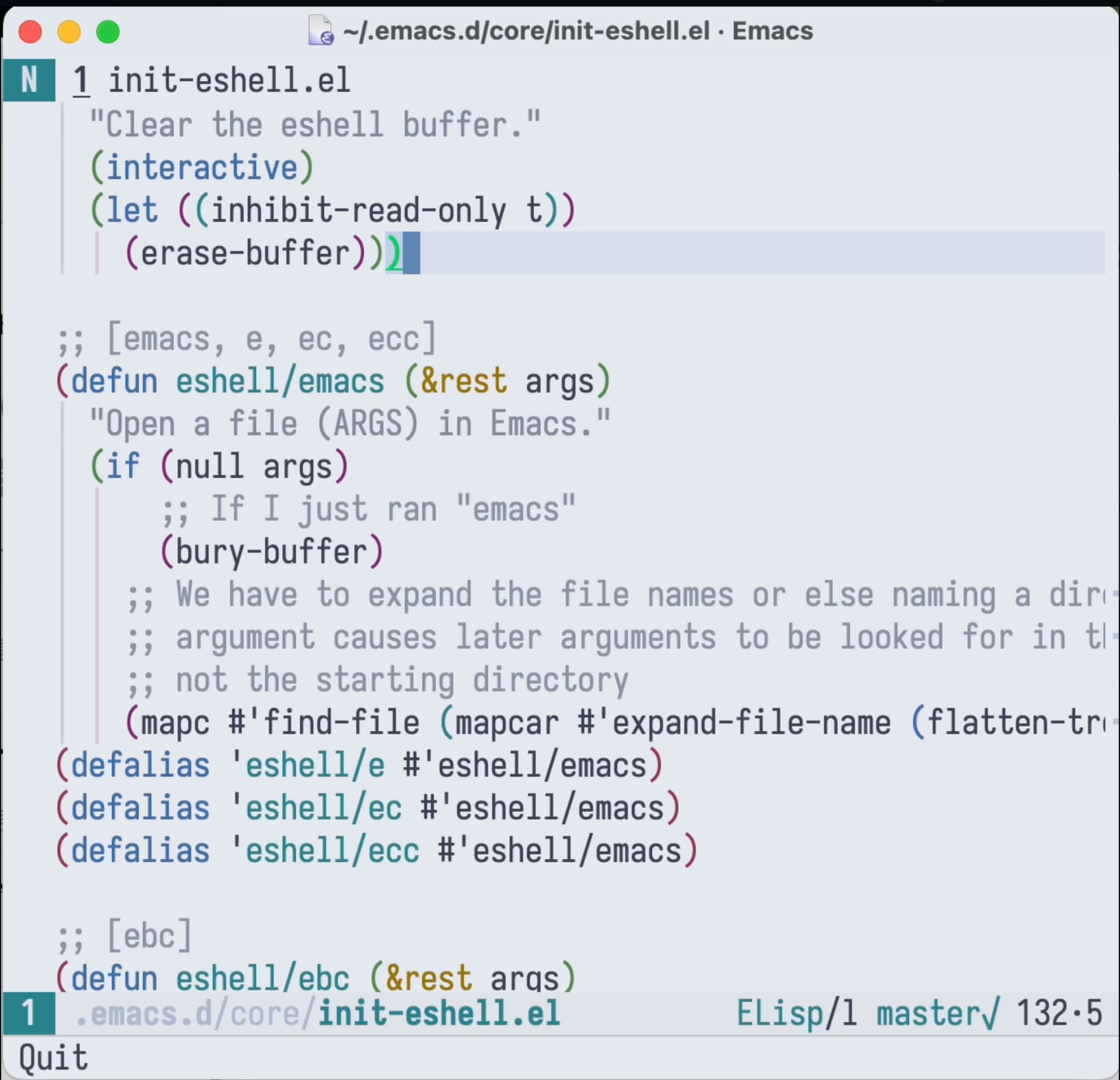
请问你有设置行高吗?emacs 如何正确地设置行高?
没有设置行高,所以纯英文符号行出现中文会略微抬高几个像素
这个时候你需要中英文合并的字体,这样就可以等高了。
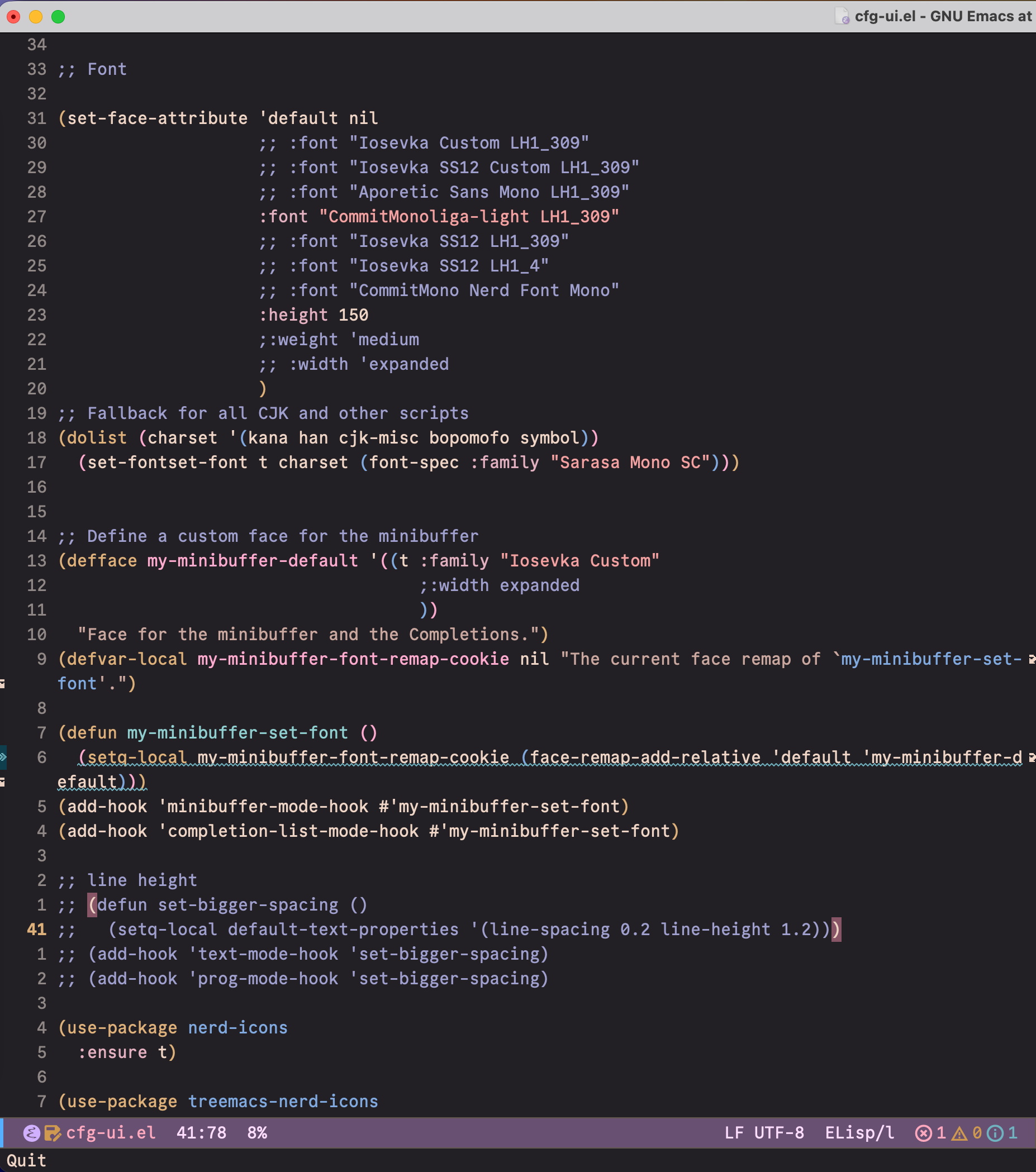
我在网上找到的接近完美的方式是这种
(defun set-bigger-spacing ()
  (setq-local default-text-properties '(line-spacing 0.2 line-height 1.2)))
但是这种方式有一点瑕疵,光标高度依然是字体高度,而不是行高度。当光标移到行尾的时候最明显。我有点强迫症,最后把字体改了,因为 emacs 的光标高度跟字体大小匹配。这样显示效果不错,缺点是不太灵活,必需为要使用的字体都提供修改行高的版本。
3 个赞
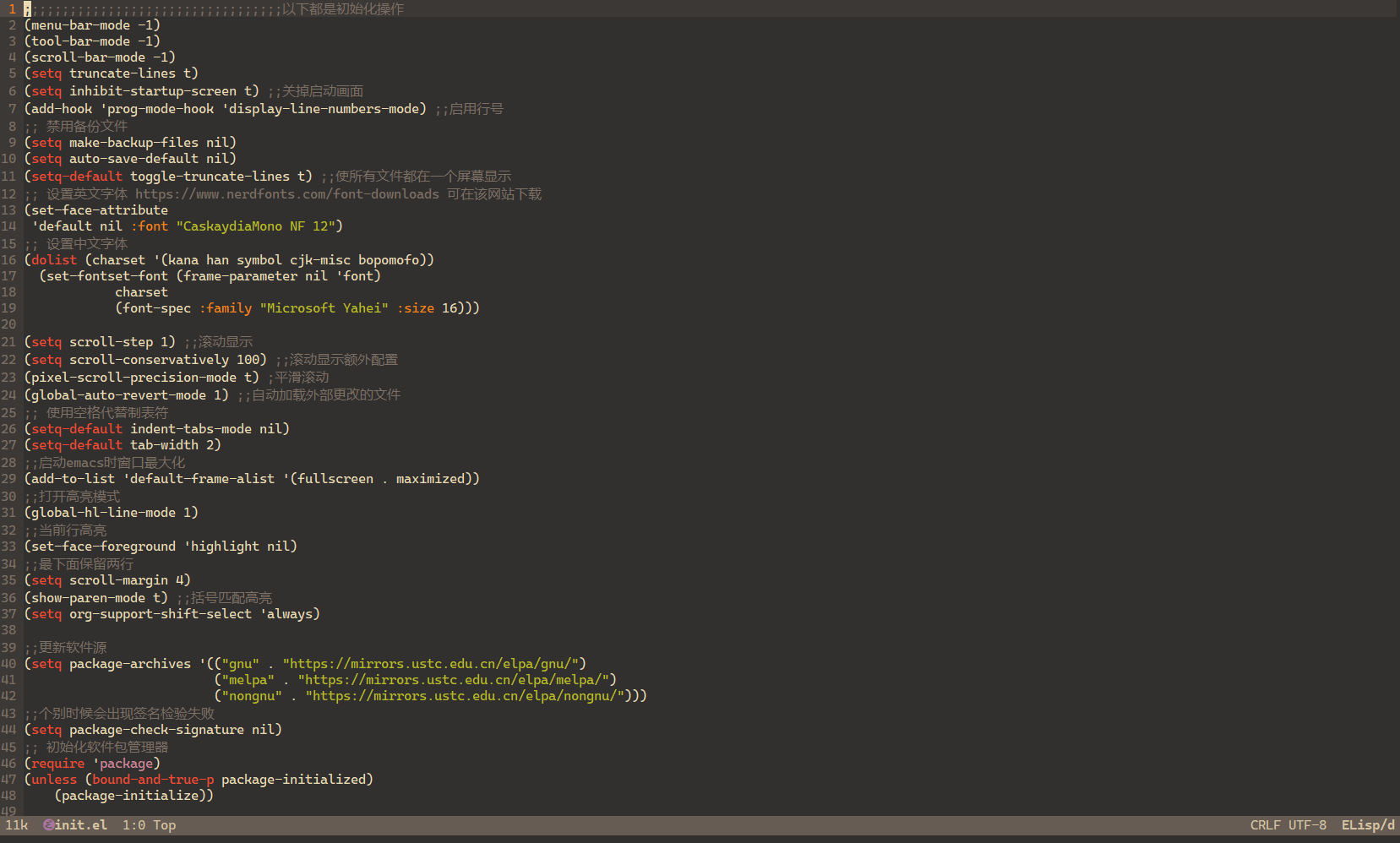
设置个简单的default, 可以,很省事