Gnus: 3.Group Buffer
Window Layout
M-x gnus默认"use-full-window", 会删掉当前的其他窗口而占据整个屏幕, 因为 gnus-use-full-window 默认设置为 t, 这会带来诸多不便. 关闭"use-full-window"的模式
(setq gnus-use-full-window nil)
Visualize Groups
Group Buffer默认只显示有未读邮件的Group,
查看其他邮件组, 有四种方法
- 在Group buffer中按键 "j":(gnus-group-jump-to-group), 选择Group后, 并能从Group Buffer中可见
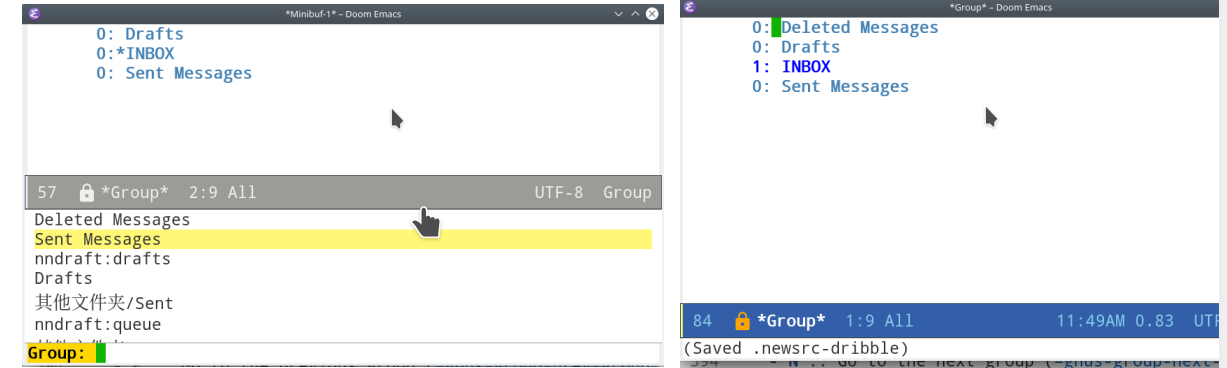
2.Group Buffer中按键 "L":(gnus-group-list-all-groups &optional ARG)
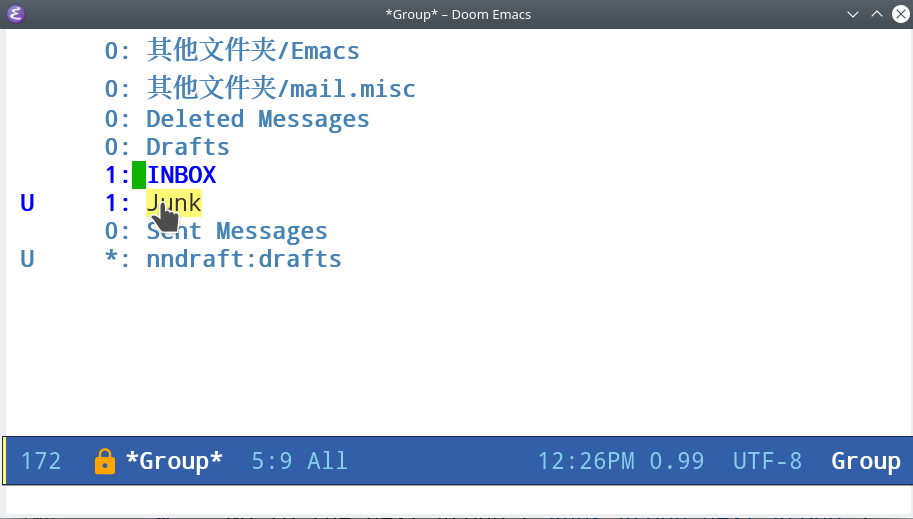
3.指定可见的邮件组, 从步骤二中的选择需要的Group, 按键G p, 弹出的对话框中加入一行 (visible . t)

此时重新连接gnus, Group Buffer中按键 Z R, gnus-summary-reselect-current-group 重新定义的Group便能显示在初始界面.
4.从Server中查看 Group Buffer中按键 ^ (gnus-group-enter-server-mode), 在 "{nnimap:qq.com} (opened)" 上按键Space
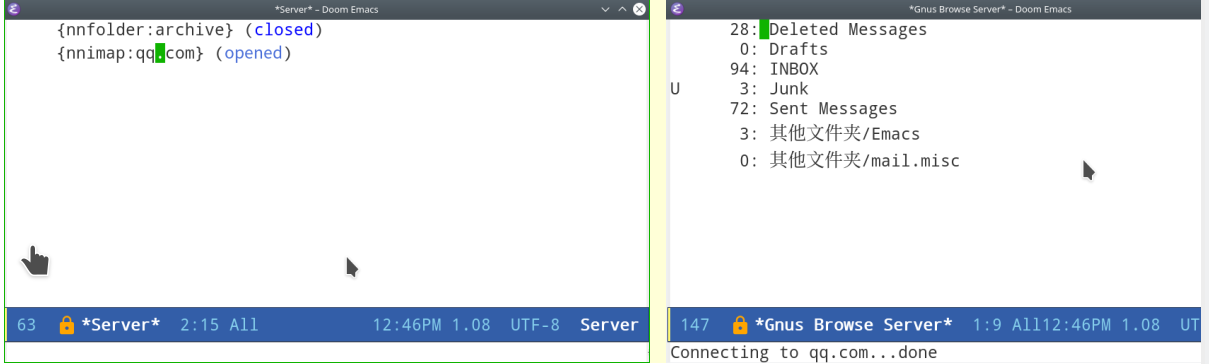
也可以一步进入Server Group Buffer: A A (gnus-group-list-active)
Archive Messages
Gnus的默认配置, 生成 "sent.%Y-%m" 格式的 Send-Mail存档, 这与imap的Send-Messages重复, 因此关闭改功能
(setq gnus-message-archive-group nil)
New Group
创建新的邮件组
G m
: Make a new group (gnus-group-make-group). Gnus will prompt you for a name, a method and possibly an address.
比如新建Starred Group G m 之后提示输入Group: Starred, 然后select-method-for-new-group: nnimap:qq.com
Z R 更新 gnus, 然后 L, 便能查看新建的starred Group 设置为可视, G p 之后, 添加一行 (visible . t)
Delete and Rename Group
G <DEL> : gnus-group-delete-group
删除当前的邮件组
b
: Find bogus groups and delete them (gnus-group-check-bogus-groups).
删除bogus邮件组
G r
: Rename the current group to something else (gnus-group-rename-group). This is valid only on some groups—mail groups mostly. This command might very well be quite slow on some back ends.
Mark Groups
c
: Mark all unticked articles in this group as read (gnus-group-catchup-current). gnus-group-catchup-group-hook is called when catching up a group from the group buffer.
C
: Mark all articles in this group, even the ticked ones, as read (gnus-group-catchup-current-all).
表组Group内所有邮件为已读
#
:
M m
: Set the mark on the current group (gnus-group-mark-group).
M-#
:
M u
: Remove the mark from the current group (gnus-group-unmark-group).
M U
: Remove the mark from all groups (gnus-group-unmark-all-groups).
M w
: Mark all groups between point and mark (gnus-group-mark-region).
M b
: Mark all groups in the buffer (gnus-group-mark-buffer).
M r
: Mark all groups that match some regular expression (gnus-group-mark-regexp).
Sorting Groups
常用的排序方法:
G S a
: Sort the group buffer alphabetically by group name (gnus-group-sort-groups-by-alphabet).
G S m
: Sort the group buffer alphabetically by back end name (gnus-group-sort-groups-by-method).
G S n
: Sort the group buffer alphabetically by real (unprefixed) group name (gnus-group-sort-groups-by-real-name).
Group Timestamp
Trace最近一次打开group的时间戳.(add-hook 'gnus-select-group-hook 'gnus-group-set-timestamp It can be convenient to let Gnus keep track of when you last read a group. To set the ball rolling, you should add gnus-group-set-timestamp to gnus-select-group-hook: 添加配置:
(add-hook 'gnus-select-group-hook 'gnus-group-set-timestamp)

(setq gnus-group-line-format
      "%M%S%p%P%5y: %(%-40,40g%) %udn")
         (defun gnus-user-format-function-d (headers)
           (let ((time (gnus-group-timestamp gnus-tmp-group)))
             (if time
                 (format-time-string "%b %d  %H:%M" time)
               "")))
Group Highlighting
Gnus Manual中推荐的highlight配色配置,
(cond (window-system
       (setq custom-background-mode 'light)
       (defface my-group-face-1
         '((t (:foreground "Red" :bold t))) "First group face")
       (defface (message "")y-group-face-2
         '((t (:foreground "DarkSeaGreen4" :bold t)))
         "Second group face")
       (defface my-group-face-3
         '((t (:foreground "Green4" :bold t))) "Third group face")
       (defface my-group-face-4
         '((t (:foreground "SteelBlue" :bold t))) "Fourth group face")
       (defface my-group-face-5
         '((t (:foreground "Blue" :bold t))) "Fifth group face")))

(setq gnus-group-highlight
      '(((> unread 200) . my-group-face-1)
        ((and (< level 3) (zerop unread)) . my-group-face-2)
        ((< level 3) . my-group-face-3)
        ((zerop unread) . my-group-face-4)
        (t . my-group-face-5)))