这是我抄来的配置 打开Emacs后M-x centaur-tabs-mode 显示Centaur-Tabs mode disabled 明明开启了怎么不显示呢?一定要加 :demand t 吗?但是加了之后很慢
还有就是图标显示不全
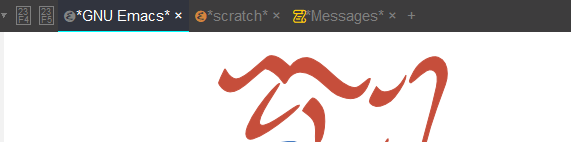
(use-package nerd-icons
  :ensure t
  :custom
  (nerd-icons-font-family "JetBrainsMonoNL NF")
)

(use-package centaur-tabs
  :ensure t
  :init
  (setq centaur-tabs-enable-key-bindings t)
  :config
  (setq centaur-tabs-style "bar"
        centaur-tabs-height 32
        centaur-tabs-set-icons t
        centaur-tabs-icon-type 'nerd-icons
        centaur-tabs-show-new-tab-button t
        centaur-tabs-set-modified-marker t
        centaur-tabs-show-navigation-buttons t
        centaur-tabs-set-bar 'under
        centaur-tabs-show-count nil
        ;; centaur-tabs-label-fixed-length 15
        ;; centaur-tabs-gray-out-icons 'buffer
        ;; centaur-tabs-plain-icons t
        x-underline-at-descent-line t
        centaur-tabs-left-edge-margin nil)
  (centaur-tabs-change-fonts (face-attribute 'default :font) 110)
  (centaur-tabs-headline-match)
  ;; (centaur-tabs-enable-buffer-alphabetical-reordering)
  ;; (setq centaur-tabs-adjust-buffer-order t)
  (centaur-tabs-mode t)
  (setq uniquify-separator "/")
  (setq uniquify-buffer-name-style 'forward)
  (defun centaur-tabs-buffer-groups ()
    "`centaur-tabs-buffer-groups' control buffers' group rules.

Group centaur-tabs with mode if buffer is derived from `eshell-mode' `emacs-lisp-mode' `dired-mode' `org-mode' `magit-mode'.
All buffer name start with * will group to \"Emacs\".
Other buffer group by `centaur-tabs-get-group-name' with project name."
    (list
     (cond
      ;; ((not (eq (file-remote-p (buffer-file-name)) nil))
      ;; "Remote")
      ((or (string-equal "*" (substring (buffer-name) 0 1))
           (memq major-mode '(magit-process-mode
                              magit-status-mode
                              magit-diff-mode
                              magit-log-mode
                              magit-file-mode
                              magit-blob-mode
                              magit-blame-mode
                              )))
       "Emacs")
      ((derived-mode-p 'prog-mode)
       "Editing")
      ((derived-mode-p 'dired-mode)
       "Dired")
      ((memq major-mode '(helpful-mode
                          help-mode))
       "Help")
      ((memq major-mode '(org-mode
                          org-agenda-clockreport-mode
                          org-src-mode
                          org-agenda-mode
                          org-beamer-mode
                          org-indent-mode
                          org-bullets-mode
                          org-cdlatex-mode
                          org-agenda-log-mode
                          diary-mode))
       "OrgMode")
      (t
       (centaur-tabs-get-group-name (current-buffer))))))
  :hook
  (dashboard-mode . centaur-tabs-local-mode)
  (term-mode . centaur-tabs-local-mode)
  (calendar-mode . centaur-tabs-local-mode)
  (org-agenda-mode . centaur-tabs-local-mode)
  :bind
  ("C-<prior>" . centaur-tabs-backward)
  ("C-<next>" . centaur-tabs-forward)
  ("C-S-<prior>" . centaur-tabs-move-current-tab-to-left)
  ("C-S-<next>" . centaur-tabs-move-current-tab-to-right)
  ;;(:map evil-normal-state-map
        ;;("g t" . centaur-tabs-forward)
        ;;("g T" . centaur-tabs-backward))
)