这个还是我当时报Bug要求他们加上的,text-mode 下启用 ispell 真的很烦人的。
1 个赞
启用 completion-preview-mode 的实用配置。
(use-package completion-preview
  :ensure nil
  :hook ( (emacs-lisp-mode . completion-preview-mode) (python-mode . completion-preview-mode) (Your-Language-Mode . completion-preview-mode) )
  :bind
  ( :map completion-preview-active-mode-map
    ("M-n" . completion-preview-next-candidate)
    ("M-p" . completion-preview-prev-candidate))
  :config
  (define-key completion-in-region-mode-map (kbd "M-n") 'minibuffer-next-completion)
  (define-key completion-in-region-mode-map (kbd "M-p") 'minibuffer-previous-completion)
  )
1 个赞
我是在 eshell 下面启用了 completion-preview-mode, 这样很像 fish 的自动补全,同时也不像 company/corfu 那样还有个菜单让你选择。通常在终端下如果出现的补全不是自己想要的,我会选择多输入一点内容,然后再让它猜,跟平常的 in-buffer 补全不太一样
3 个赞
(setq flymake-show-diagnostics-at-end-of-line t)
这个不错,我挺喜欢的。
4 个赞
It’s exciting to see the excellent improvements you’ve made to your Emacs configuration after your update to version 30. I think it is great you could add editorconfig, which-key, and use-package directly in your config as it makes managing packages easier. I’m glad that you updated treesit-language-source-alist to be in sync with current grammars for Go and C++, although it is unfortunate that the default modes do not support these new versions. I think it’s well done how you’re using the tab-bar-tab-name-format-functions variable for better tab-bar configuration, instead of rewriting the logic. I know that completion-preview-mode is a fun option to play around and see what it can do for you, but as you pointed out the display versus AI completion can make it awkward to use on an every day basis. Since the update, I’ve been experimenting with native-comp for speedier compilation, and also liked the corfu-mode as a good alternative to traditional pop-up completions. Let me know your findings–and I would love to hear more if you discovered any other fun tweaks in the new release!
9 个赞
我们坛子里还有外国友人?
很惊讶啊,估计用Google翻译看的坛子,哈哈
有好几个的
现在网页翻译真的很方便了,我用这个上俄语技术网站也没没太大问题
visual-wrap-prefix-mode:Emacs 30 新增的显示层缩进换行模式。它只影响视觉换行后的前缀/缩进,不改 buffer 文本。适合 Org、Markdown、邮件这种长段落:软换行后的第二行会按视觉缩进对齐,看起来比普通 visual-line-mode 更整齐(见 https://emacsredux.com/blog/2026/03/01/soft-wrapping-done-right-with-visual-wrap-prefix-mode/)
kill-ring-deindent-mode:Emacs 30 新增的全局 minor mode。开启后,复制/kill 一段有共同缩进的文本时,会按起始列自动去掉这部分缩进再放进 kill-ring。适合从函数体、列表、嵌套代码块里复制片段到别处,粘贴出来不会带一大坨多余左缩进。
2 个赞
是不是可以拉一個新帖子:31新feature:grin:
1 个赞
visual-wrap-prefix-mode 被 Emacs 31 break 了,具体表现为普通字符开头的行不会获得任何全局缩进,无论 visual-wrap-extra-indent 设置为多少
暂时没写出来 advice 恢复原始行为 写出来了
大佬可以将 advice 贴下吗?
(defun my-visual-wrap--apply-to-line (orig)
  (if-let ((prefix (fill-match-adaptive-prefix)))
      (if (string-empty-p prefix)
          (put-text-property
           (point) (pos-eol)
           'wrap-prefix
           (make-string visual-wrap-extra-indent ?\s))
        (funcall orig))
    (funcall orig)))

(advice-add
 'visual-wrap--apply-to-line
 :around
 #'my-visual-wrap--apply-to-line)
啊,你也遇到相同问题了吗
2 个赞
没有,我还在用 30,不过等后面到 31 迟早会遇到
原始功能不一样了吗,我还没感觉出来
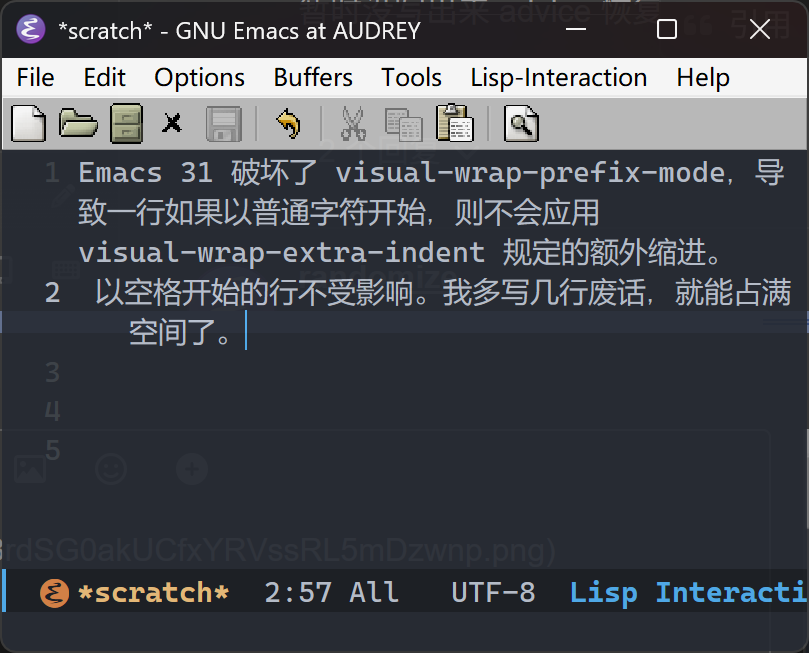
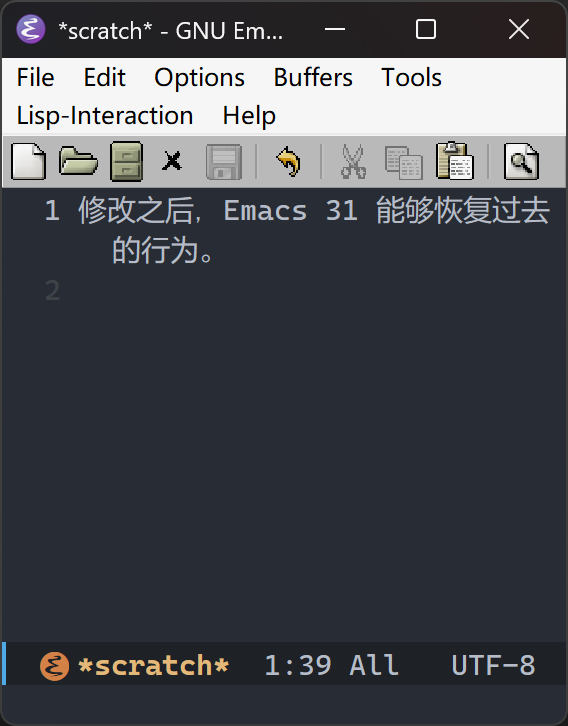
虽然我感觉 31 的更合理一点啊🤣
我依赖这个缩进来区分软换行和硬换行,比单纯看行号空白容易。
可能是因为我写作比较多?然后影响代码的习惯
1 个赞
如果启用了 org-indent-mode, 需要禁用此模式,不然有冲突